
Backend for Frontend: One Backend per User Experience
- #engineering
- #architecture
- #microservices
- #api
- #bff
Your mobile app and your web app shouldn't have to share one API.
That sounds obvious when you say it out loud. But most products start exactly that way: one backend, one set of endpoints, and every client calling the same thing.
And for a while, it works.
Then the clients drift apart. The mobile app downloads fields it never shows. One screen needs four or five round trips before it can render. The admin console wants bulk data and strict roles. And every frontend team ends up waiting in the same queue to change the same backend.
The fix has a name: Backend for Frontend, or BFF. The idea fits in one line:
One backend per user experience.
Let's unpack what that means, where it helps, and where it quietly becomes a problem.
The momo shop with three counters
Picture a busy momo shop in Kathmandu.
There's one kitchen. Same dough, same filling, same steamers. But the shop serves three kinds of customers: people sitting at tables, riders picking up delivery orders, and a catering client who wants 500 plates for a wedding on Saturday.
If all three had to order from the same counter, in the same format, it would be chaos. The dine-in customer wants a plate and some achar right now. The delivery rider wants sealed boxes and a bill. The catering client wants a quote, a schedule and a headcount.
So the smart shop opens three counters. The kitchen stays shared. Each counter speaks the language of its own customer.
That's a BFF. The kitchen is your domain services. The counters are your BFFs.
What a BFF actually is
A Backend for Frontend is a small server-side layer built for one specific client experience: a Web BFF, a Mobile BFF, an Admin BFF.
The name comes from Phil Calçado's team at SoundCloud. Sam Newman popularised the pattern in his 2015 write-up, "Pattern: Backends For Frontends", describing it as single-purpose edge services for UIs and external parties. Newman also passes on a neat rule of thumb from Stewart Gleadow (who credits Calçado and Mustafa Sezgin): one experience, one BFF.
The problem Newman describes is the one above. Mobile clients want fewer calls and less data because of screen size, battery and data plans. A general-purpose API tries to serve everyone, and it turns into a bottleneck because many teams are changing one deployable thing.
The part people often skip is ownership. In Newman's framing, a BFF is tightly coupled to one user experience, so it's usually owned by the same team that builds the UI. The UI and its API ship together. No ticket to another team just to add one field to a response.
Microsoft's Azure Architecture Center sums it up just as plainly: create a separate backend service for each frontend interface.
How it works
The flow is simple:
Mobile App
   ↓  1 call
Mobile BFF
   ↓  fan-out (parallel where possible)
Users · Catalog · Orders · Inventory · Payments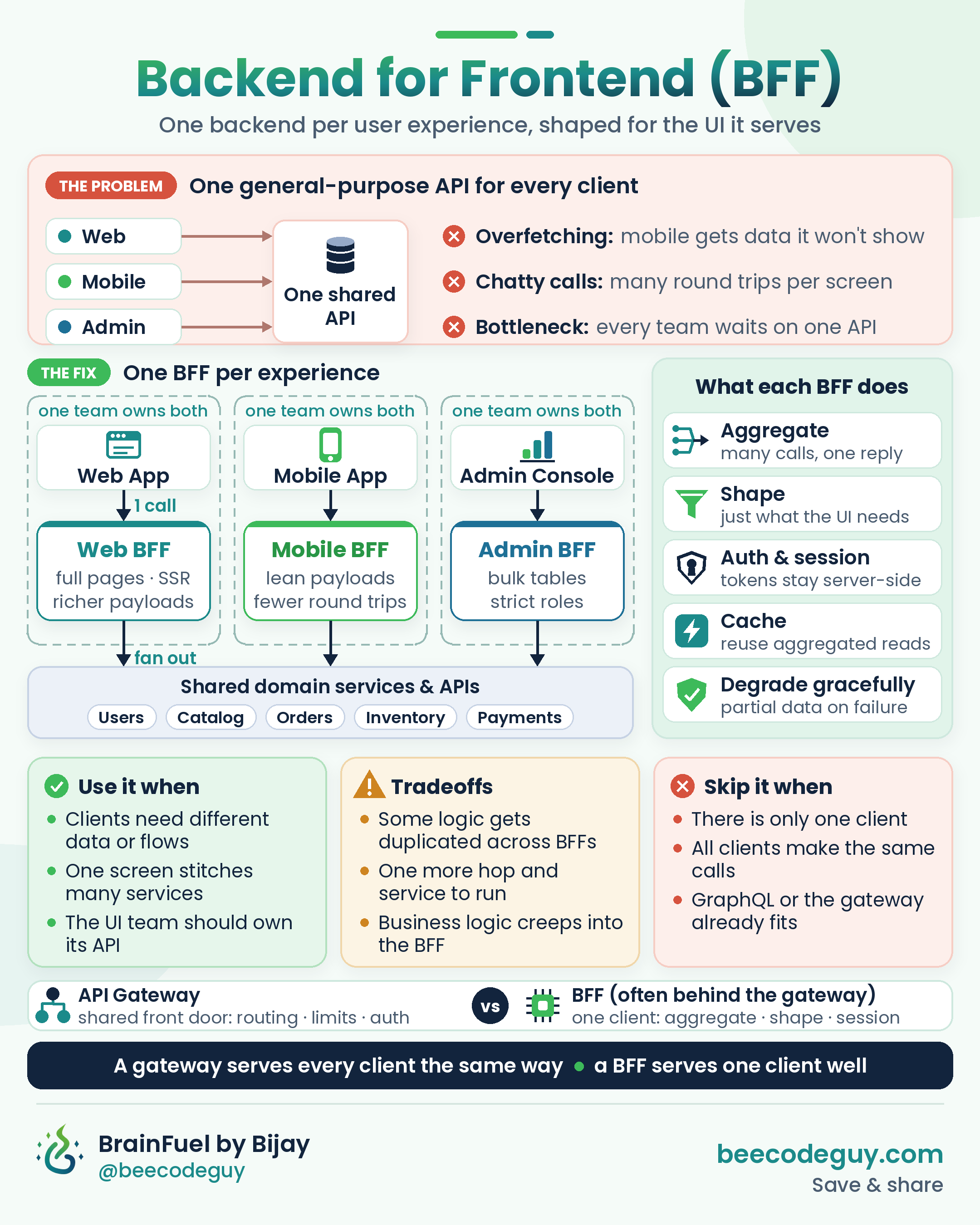
The client makes one call. The BFF turns it into several downstream calls, ideally in parallel, and stitches the results into exactly the shape that screen needs.
Inside the BFF, the work usually falls into five buckets:
- Aggregate. Many service calls, one reply.
- Shape. Return only what the UI renders. Rename, flatten and format for the client.
- Auth and session. Handle the user's session and keep tokens on the server side (more on this below).
- Cache. Reuse aggregated reads that are expensive to build.
- Degrade gracefully. If a non-critical service is down, return a partial response instead of failing the whole screen.
Newman's own example is a wishlist screen built from a Wishlist service, a Catalog service and an Inventory service. Here's a small TypeScript sketch of that idea. It's illustrative, not production code:
// Mobile BFF: GET /wishlist
export async function getWishlist(userId: string) {
  const items = await wishlistService.list(userId); // critical: let it throw

  const [catalog, stock] = await Promise.allSettled([
    catalogService.getMany(items.map((i) => i.productId)),
    inventoryService.getStock(items.map((i) => i.productId)),
  ]);

  return items.map((item) => ({
    id: item.productId,
    name: catalog.status === "fulfilled" ? catalog.value[item.productId]?.name : null,
    thumb: catalog.status === "fulfilled" ? catalog.value[item.productId]?.thumbSmall : null,
    inStock: stock.status === "fulfilled" ? stock.value[item.productId] > 0 : null, // unknown, not "false"
  }));
}
Notice what's happening. The wishlist itself is critical, so if it fails, the request fails. Catalog and stock are fetched in parallel, and if one of them is down, the app still gets a list it can render. The mobile client gets a small thumbnail and a boolean, not the full product document and a raw stock count.
The picture
One general-purpose API vs one BFF per experience. Each BFF aggregates, shapes, handles session, caches and degrades gracefully, while the domain services stay shared.
BFF vs API gateway
This is the question that comes up every time. They sound similar. They aren't the same thing.
An API gateway is the shared front door. Routing, rate limits, authentication checks, TLS, monitoring. It treats every client the same way, and that's the point.
A BFF is client-specific. It knows what the mobile home screen needs and builds exactly that.
In practice, they often work together. Microsoft's reference example puts the gateway (API Management) in front of the per-client BFFs. The OAuth guidance for browser apps (more below) goes further and says the BFF shouldn't be confused with an API gateway or a reverse proxy.
The way I think about it:
A gateway serves every client the same way. A BFF serves one client well.
What about GraphQL? It's a different tool, but it overlaps. If each client can ask for exactly the fields it needs, a lot of the "shape the payload" job goes away. Microsoft notes that GraphQL with frontend-specific resolvers might make a separate BFF unnecessary. AWS even lists AppSync GraphQL as one way to run a BFF. So GraphQL isn't a BFF, but it can be one way to build one, or a reason you don't need one.
When to use it, and when to skip it
Use it when
- Your clients genuinely need different data or different flows.
- One screen has to stitch together several services.
- You want the UI team to own its API and ship without waiting on a shared backend team.
Skip it when
- You only have one client. A "BFF" for a single frontend is usually just your backend with extra steps.
- Every client makes the same or very similar calls. Microsoft calls this out directly.
- GraphQL or your existing gateway already shapes the data well enough.
The tradeoffs nobody puts on the slide
Duplication. Your Web BFF and Mobile BFF will end up with similar code. Newman treats this as an accepted cost. When it gets painful, you can pull it into a shared library (carefully, because shared libraries create coupling of their own), or push that aggregation down into a proper domain service. What he warns against is merging everything back into one "general-purpose aggregating edge API". That's how you end up with the original bottleneck again, just one layer up.
One more hop. Every BFF is another network hop, another service to deploy, monitor and keep alive. Microsoft lists the added latency and operational overhead as real considerations.
The fat BFF. This is the one that bites quietly. Someone needs a discount rule for the mobile checkout. The BFF is right there. It's quick. Six months later, the mobile app and the web app calculate prices differently, and nobody knows which one is right.
AWS puts it well: a BFF doesn't follow a domain model. It's there for authorization towards private APIs, aggregation and transformation. Business rules belong in your domain services. The BFF decides how data is presented, not what the business allows.
A simple test: if two BFFs would need the same rule to stay correct, that rule doesn't belong in either of them.
BFF on a modern stack
Next.js and SSR as a BFF layer
If you're already running Next.js, you might have a BFF without calling it one.
Route Handlers and Server Components already sit between the browser and your services. They can call several APIs, merge the results, keep secrets on the server and send the browser only what it needs. The Next.js docs say this directly: Next.js supports the "Backend for Frontend" pattern.
The same docs also add an important caveat: it's not a full backend replacement. Use it as the thin, UI-shaped layer in front of your real services, not as the place where your core domain logic, heavy jobs and data ownership live. That's just the fat BFF problem with a nicer developer experience.
The OAuth BFF pattern for browser apps
This is where BFF stops being just a performance pattern and becomes a security one.
Single-page apps traditionally held OAuth access tokens in the browser. That means any script running on the page, including an injected one, could potentially reach them.
The IETF's OAuth 2.0 for Browser-Based Applications (RFC 10017, BCP 212) describes a BFF approach instead:
- The BFF acts as a confidential OAuth client on the server.
- Access and refresh tokens stay on the server.
- The browser only gets a Secure, HttpOnly session cookie, which JavaScript can't read.
- The BFF attaches the right token when it calls downstream APIs.
The RFC strongly recommends this architecture for business applications, sensitive applications and applications that handle personal data.
It's not magic. You still need sensible cookie settings, CSRF protection and good session handling, and a compromised page can still make requests through the BFF while the user is logged in. But it takes long-lived tokens out of the browser, and that's a meaningful improvement.
One nuance worth calling out: Microsoft suggests keeping cross-cutting concerns like authentication, monitoring and rate limiting out of the BFF where possible. That doesn't conflict with the OAuth BFF. Let the gateway and your identity provider handle the shared checks. Let the BFF handle the session for its own client.
Final thoughts
The BFF pattern isn't about adding layers because architecture diagrams look nicer with more boxes.
It's about admitting that your web app, your mobile app and your admin console are different customers. They deserve different counters, even if they share the same kitchen.
Start with one API. Add a BFF when your clients really drift apart. Keep it thin. Keep business rules in the domain. And let the team that builds the UI own the backend that serves it.
One experience. One BFF.
Are you running a BFF today? Is it a separate service, or is a Next.js or SSR layer quietly doing the job? I'd love to hear how you've drawn the line.